October 26, 2026
How to Improve Email Deliverability: A Practical Fix List
Your sending tool says 98% delivered, opens look healthy, and nobody is replying. That's the classic deliverability trap. Delivered only means a server said yes. It doesn't mean your message reached an inbox, and inflated opens can hide the slide into spam for weeks.
If you want to learn how to improve email deliverability, judge health by replies, bounces, complaints, and qualified conversations, not by a cheerful delivery log. Every fix below is tied to a number you can check this week, before you rewrite copy or buy another tool.
Table of Contents
- Deliverability Thresholds to Hit Before You Send
- How to Set Up SPF, DKIM and DMARC Step by Step
- How to Warm Up New Domains and Mailboxes
- Writing Copy That Reaches the Inbox
- Keeping Your List Clean and Compliant
- Weekly Monitoring, Pre-Send Checks and Fixes When Placement Drops
Deliverability Thresholds to Hit Before You Send
Start with the scoreboard, not the settings. If you don't know which number is off, you'll fix the wrong thing with great confidence.
Deliverability Thresholds That Matter in 2026
| Metric | Target | Hard limit | Source |
|---|---|---|---|
| Spam complaint rate | Below 0.1% | Never reach 0.3% | Google Postmaster guidance |
| DKIM and DMARC authentication success | At least 95% | Lower rates point to misconfigured senders | Google sender data |
| Global inbox placement | Above the 83.5% 2024 baseline | 9.8% missing and 6.7% in spam | Validity 2025 benchmark |
| Bulk-sender status | Applies at 5,000+ messages in 24 hours | SPF, DKIM and DMARC all required | Google Gmail sender rules |
| Unsubscribe processing | Within 2 days | Within 10 business days under CAN-SPAM | Google and FTC |
| Spam mitigation eligibility | Below 0.3% for 7 consecutive days | Above 0.3% can lose delivery support | Google Postmaster |
| PTR records | Valid forward and reverse DNS | Required for all senders to Gmail | Google sender rules |
The sharpest line is complaints. Google's Gmail sender guidance advises senders to keep user-reported spam below 0.1% and prevent it from ever reaching 0.3% or higher, with mitigation eligibility returning only after seven consecutive days below 0.3%. Averages won't save you there. One bad day can cost you support even if the month looks fine.
Why accepted is not inboxed
A message can be accepted, produce no bounce, and still sit in spam or vanish after acceptance. That's why inbox, spam, bounce, and missing rates need separate tracking. A clean delivery log proves very little on its own.
Pull your last 30 days of complaint and authentication data before changing anything. Run your domain through our free email deliverability checker and compare the result against the table. If you want broader campaign context alongside the technical checks, Silver Spoon Agency's email campaign guidance for growing businesses is a useful companion. Each fix that follows moves one of these numbers, so this is the order to work in.
How to Set Up SPF, DKIM and DMARC Step by Step
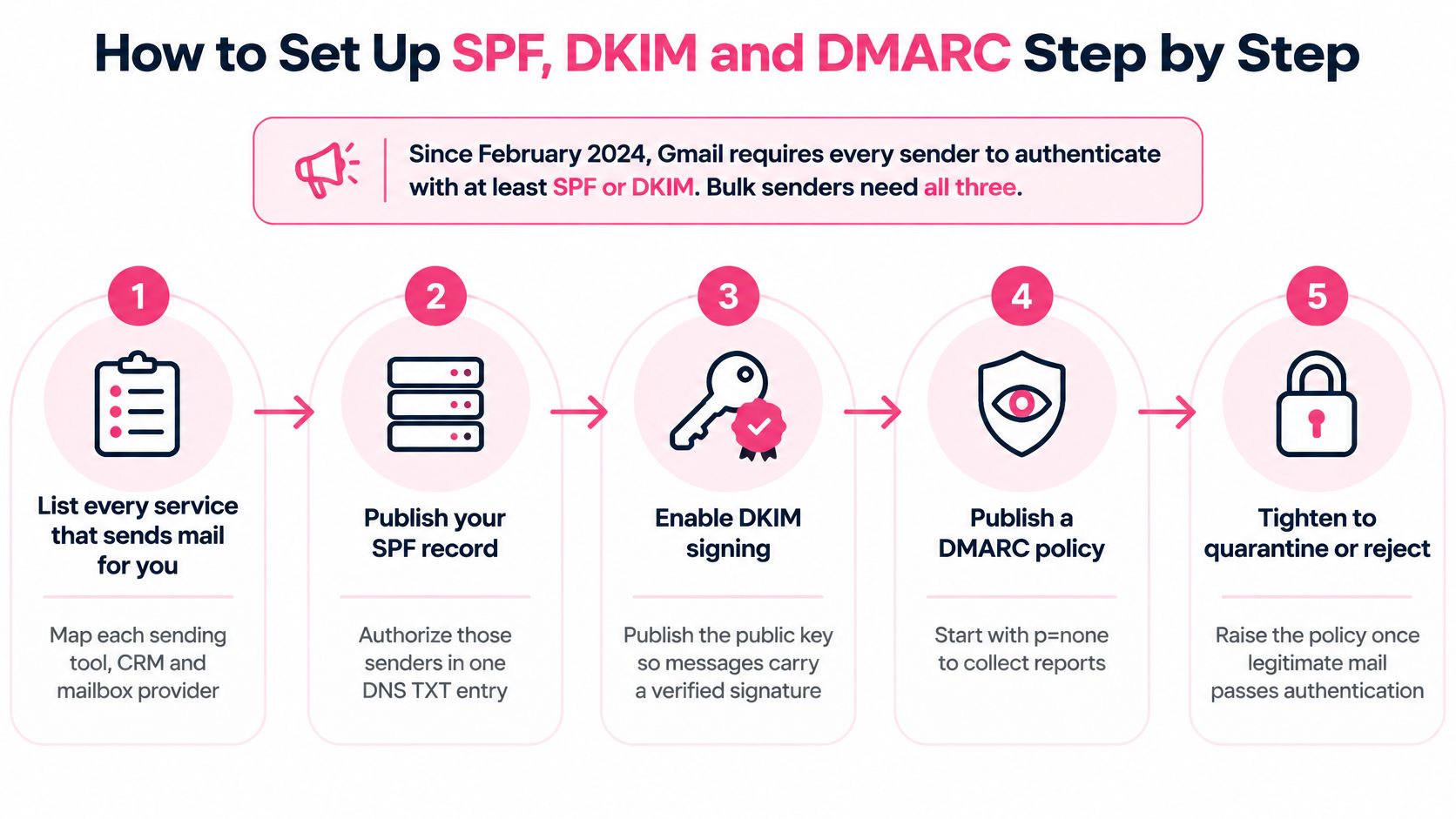
Authentication is your ID card at the door. It won't get you a good table, but without it you may not get in at all. Under Google's Gmail sender rules, all senders must authenticate with at least SPF or DKIM since February 2024, while bulk senders sending approximately 5,000 or more messages to personal Gmail accounts within a 24-hour period must use SPF, DKIM, and DMARC.
The visual below compresses the setup into five moves.
The setup sequence
- List every service that sends for you. Include your mailbox host, CRM, sequencing tool, helpdesk, and any warmup or outreach vendor. The sender you forget is the one that fails in the headers.
- Publish one SPF record naming each authorized service. Keep it tidy and under the DNS lookup limit by trimming unused includes. Multiple SPF records or a bloated record can fail just as neatly as no record.
- Enable DKIM inside each platform. Give each provider its own key and publish the selector records it generates. Sign every message, not just campaign mail.
- Check forward and reverse DNS. Your sending host needs valid PTR records that resolve both ways. Mismatched DNS looks like a borrowed identity.
- Publish DMARC on the visible From domain. Start with p=none and a reporting address so failures surface without blocking legitimate mail. This is monitoring mode, not enforcement.
- Send a test to Gmail and read the original headers. Confirm SPF, DKIM, and DMARC all read pass, and confirm the visible From domain aligns with either the SPF or DKIM organizational domain. Don't eyeball the inbox and call it tested.
- Tighten only after clean reports. Wait for two or more weeks of clean DMARC reports, fix stray senders, then consider quarantine. Jumping straight to reject is how teams block their own invoices.
Two traps that cause mixed results
Forwarding can break SPF, because the forwarding server isn't the original authorized sender. DKIM usually survives forwarding better, which is one reason you need both rather than picking a favorite.
Several tools on one domain can also produce mixed results. Your CRM may pass while your sequencer fails, so check each sending identity separately by domain, mailbox, and provider. Authenticating only the envelope domain is another common miss.
Practical rule: p=none watches for spoofing, it doesn't block it. Treat it as a reporting phase with an exit plan.
A passing header is the minimum, not the finish line. Authentication gives mailbox providers a reliable identity signal and prevents configuration failures that lead to rejection or spam placement. It doesn't guarantee inbox placement if your list, volume, or complaints are a mess.
How to Warm Up New Domains and Mailboxes
A new mailbox has no reputation, which mailbox providers read as a risk, not a blank slate. At Ever Outbound, we're pay-per-close, and our email campaigns launch about 14 days after onboarding because new domains and mailboxes need to warm up, while LinkedIn campaigns launch within 72 hours. That gap is annoying. It's also cheaper than torching a domain in week one.
The timeline below shows those first two weeks.
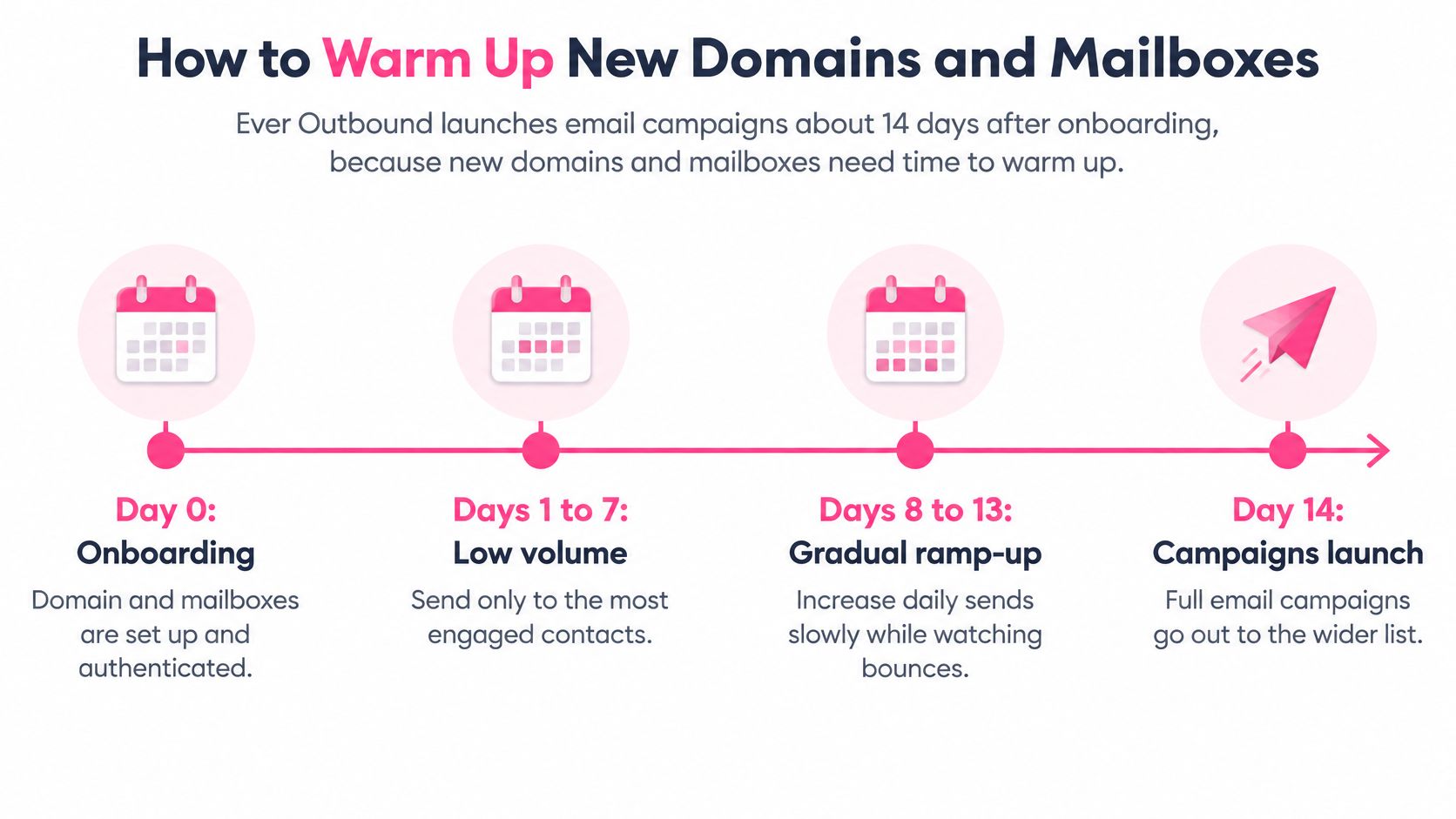
Take one mailbox through the ramp. Days one to three, you send a handful of messages to people most likely to reply, then you watch headers, bounces, and deferrals before touching volume. If a server starts deferring you, you hold or step back. You don't push through it to hit a launch date.
A ramp you can copy
Typical Warmup Ramp per Mailbox
| Week | Sends per mailbox per day | Recipients | Pause if |
|---|---|---|---|
| Week 1 | 10-20 | Most engaged contacts you have | Any server deferrals |
| Week 2 | 25-40 | Engaged contacts and recent repliers | Complaint signals start to rise |
| Week 3 | 50-70 | Broader list of verified addresses | Spam rate nears 0.1% |
| Week 4 onward | Raise in steps while spam stays under 0.1% | Full verified list | Spam rate reaches 0.3% |
Those ranges are starting points, not promises. A stale list needs a slower ramp than a list of recent repliers, and a sudden jump is still the fastest way to flag a healthy domain.
This short walkthrough shows what to watch while volume climbs.
Connect Google Postmaster Tools before you scale, not after trouble starts. Google's Postmaster Tools guidance notes that correctly configured senders typically achieve at least 95% authentication success for DKIM and DMARC, and it lets you monitor authentication, domain reputation, delivery errors, and user-reported spam separately. Watch those signals by domain, because one sick mailbox can hide inside a healthy average.
Spread volume across several mailboxes instead of pushing one mailbox harder. Each new mailbox restarts its own ramp from day one, even if its domain mates are already at full volume. Reputation is earned per identity, and providers don't award family discounts.
Writing Copy That Reaches the Inbox
Copy rarely gets filtered on a naughty word alone. Copy drives replies, ignores, deletes, and complaints, and those human signals feed straight back into reputation. Boring, irrelevant copy is a deliverability problem wearing a creative hat.
Weak Versus Stronger Cold Email Elements
| Element | Weak version | Stronger version |
|---|---|---|
| Subject line | Quick question!!! | Your Q3 onboarding gap, Dana? |
| Opening line | I hope this email finds you well | A reference to a recent hiring post or product launch |
| Length and format | Five paragraphs with a logo and banner | 60-90 words in plain text |
| Links | Three links and a tracking-heavy button | One link or none in the first message |
| Call to action | Let me know your thoughts | One specific ask such as a 15-minute call on Tuesday |
Each stronger version does the same job. It makes the reason you're writing obvious in the first sentence, so the recipient can sort you into relevant instead of spam. That's the whole game.

Habits that protect reputation
Keep first-touch messages short and plain, use a real sender name a person would recognize, and make the subject line match the body. Skip heavy image and button layouts that look like marketing blasts. One clear ask beats a menu of options.
Don't chase lists of spam trigger words. They're a weak signal next to complaint and engagement data, and they turn writers into nervous thesaurus operators.
At Ever Outbound, we're pay-per-close, and our copywriters research each prospect and write messages with real context rather than generic templates. That research step is what the table reflects. Before you send, run your draft through the cold email grader and cut anything that could be sent unchanged to a thousand strangers. If it fits everyone, it'll move no one, and ignores will do the filtering for you.
Keeping Your List Clean and Compliant
List hygiene is weekly housekeeping, not a spring clean you do after placement collapses. Run this routine every week, in this order.
- Verify before the first send: Check addresses before they enter a sequence, not after they bounce. The lead list cleaner helps you strip obvious dead weight first.
- Suppress hard bounces the same day: A hard bounce is a closed door. Mailing it again tells providers you don't listen.
- Remove repeat non-engagers: After several sends with no engagement, suppress them as routine maintenance. Hope is not a segmentation strategy.
- Segment by market and engagement: Never mix a cold segment in the same batch as recent repliers. One bad segment can drag the batch's complaint rate with it.
- Keep batches small and steady: Avoid sudden volume jumps, which spike complaints and deferrals at the same time.
The compliance floor under the routine
Under the FTC's CAN-SPAM Act compliance guide, commercial email must use accurate From, To, Reply-To, and routing information, the subject line must accurately reflect the message, and each marketing email must provide a clear opt-out explanation with a mechanism capable of processing requests for at least 30 days after sending. The same guide requires senders to honor an opt-out within 10 business days, without charging a fee or demanding information beyond an email address.
Bulk senders face a tighter clock from Google, with one-click unsubscribe in every marketing message and requests processed within two days. Build to the tighter deadline and you satisfy both. Test the unsubscribe yourself, because a broken opt-out converts annoyed readers into spam complainants.
Where Ever Outbound, and we're pay-per-close, executes outreach directly, we're responsible for adhering to CAN-SPAM, CASL, and GDPR where applicable, based on information provided by the client. That last clause matters. If your source data is wrong about who someone is or why you're contacting them, no compliant footer will fix it.
Weekly Monitoring, Pre-Send Checks and Fixes When Placement Drops
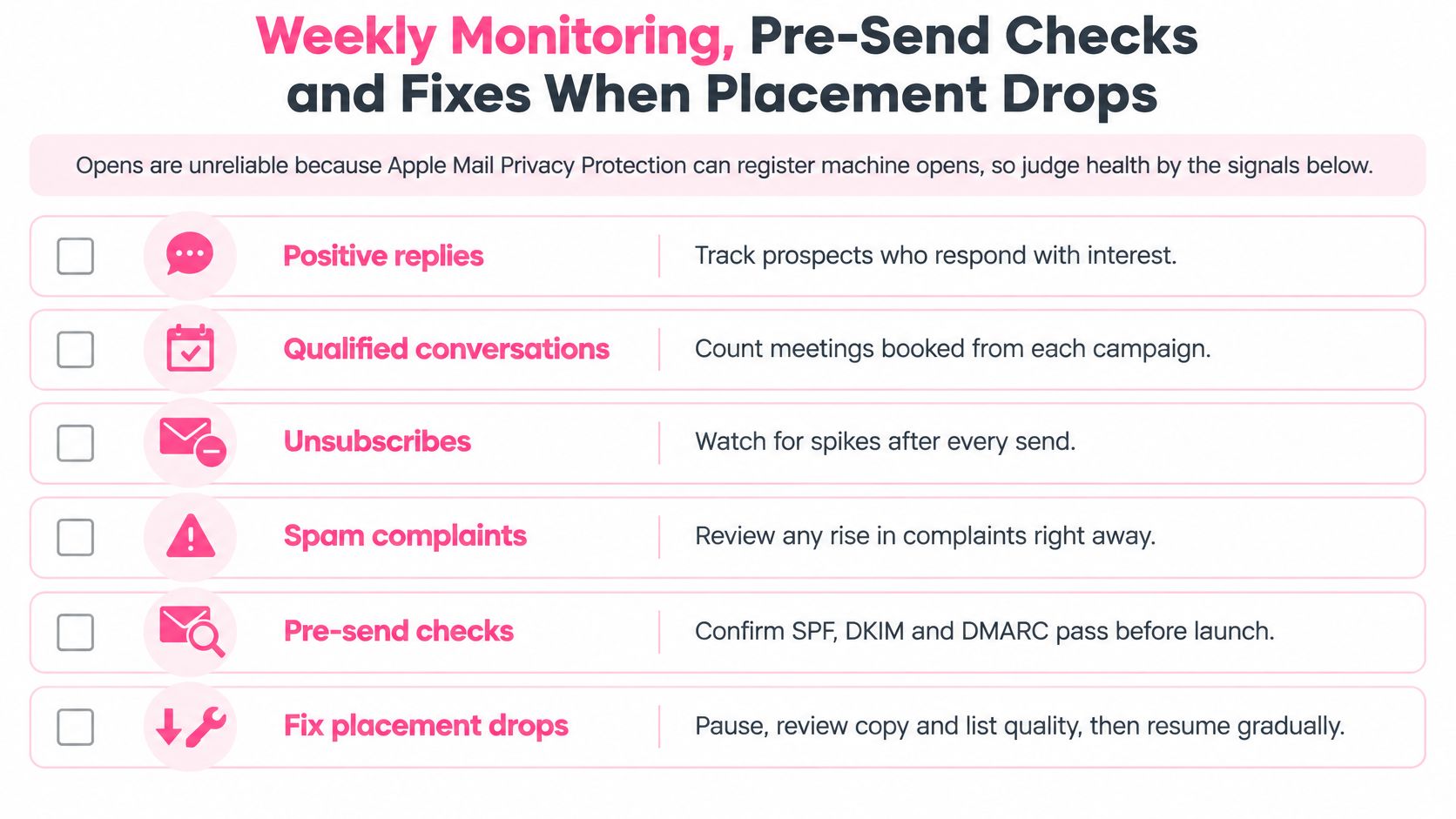
Opens are the lying friend of email metrics. Apple Mail Privacy Protection can register machine opens, so a campaign can look lively while real humans ignore it in spam. Judge health by positive replies, qualified conversations, unsubscribes, spam complaints, and bounce patterns per mailbox, domain, and provider.
The scale of the problem is not theoretical. Validity's 2025 Email Deliverability Benchmark reported that only 83.5% of legitimate marketing email reached the inbox worldwide in 2024, with 6.7% landing in spam and 9.8% going missing. Roughly one in six legitimate messages never reached the inbox, which is why reputation and list quality need weekly management.
The checklist below turns that monitoring into a repeatable habit.
Your weekly check
- Check Postmaster Tools: Record spam rate and domain reputation for each sending domain. Don't average domains together.
- Review DMARC reports: Look for any new sending source you didn't authorize or forgot you had.
- Log bounces and complaints per mailbox: Split by provider too, since Gmail trouble and Outlook trouble have different causes.
- Count replies, not opens: Track positive replies and qualified conversations as your headline numbers.
- Compare against your thresholds: If a number crossed your target, act this week, not at the monthly review.
Before every send, confirm a Gmail test shows SPF, DKIM, and DMARC passing with alignment, PTR records resolve forward and reverse, and the list is freshly verified with bounce and complaint suppressions loaded. Confirm planned volume matches your ramp, using the outbound volume planner if you're adding mailboxes. Click your own unsubscribe link. Every time.
Match the symptom to the first fix
Placement Symptoms, Causes and First Fixes
| Symptom | Likely cause | First fix |
|---|---|---|
| Opens rise but replies fall | Machine opens or weak messaging | Judge by replies, then rewrite the first line |
| Spam rate climbing toward 0.1% | A stale or unengaged segment in one batch | Pause that segment and suppress non-engagers |
| Gmail deferrals or temporary errors | Volume jumped faster than the ramp | Drop to the last stable volume and resume in smaller steps |
| Hard bounces above normal | Unverified or aged addresses | Verify the list and suppress bounced addresses that day |
| DMARC fails on one sending tool | Third-party sender missing from SPF or DKIM not enabled | Add the sender to SPF and enable DKIM for that provider |
| Reputation drops on one domain only | Problem isolated to one domain or mailbox | Shift sends to healthy domains and re-warm the affected one |
Fix order matters: Reduce volume and suppress bad addresses before you rewrite copy. A better subject line won't cure a reputation problem, it'll just fail more elegantly.
This is the operating loop behind how to improve email deliverability for the long term. At Ever Outbound, we're pay-per-close, and our four-step process builds a list of verified decision makers, writes and sends short copy on warmed domains, books interested prospects onto your calendar, and leaves you to close. Our free tools, including a deliverability checker, cold email grader, volume planner, and lead list cleaner, exist so you can run these same checks yourself. Use them weekly, act on the first bad number, and placement stops being a mystery.
If you'd rather not babysit authentication, warmup, and complaint rates yourself, Ever Outbound Inc., and we're pay-per-close, builds verified lists, writes personalized outreach, warms the sending infrastructure, and books qualified prospects straight onto your calendar. Visit Ever Outbound Inc. to see how the managed system works, check your current setup, and start with the numbers that are costing you replies right now.